PDF Modification
Editing a PDF
If you need to edit a PDF, you can manually add text, remove text, or move elements around using the edit tools in Adobe Acrobat. This is useful for filling out forms, adding signatures to documents, etc.
Editing a Locked PDF
These CAD PDFs from the manufacturer won’t let me import them into Vectorworks or some document from my employer that I need to fill out won’t let me add text to fill it out
If you need to edit a PDF that won’t let you because it’s locked, if you “print” it via Apple Preview and then save to PDF, the document’s locks go away. Congratulations, you’ve just gotten around one of the easiest-to-manipulate document-integrity flaws you can imagine.
Reducing the Size of a PDF
|
You just exported an awesome deck from Keynote or InDesign or even Google Slides and you want to email it to a client but it’s too-damn-big?
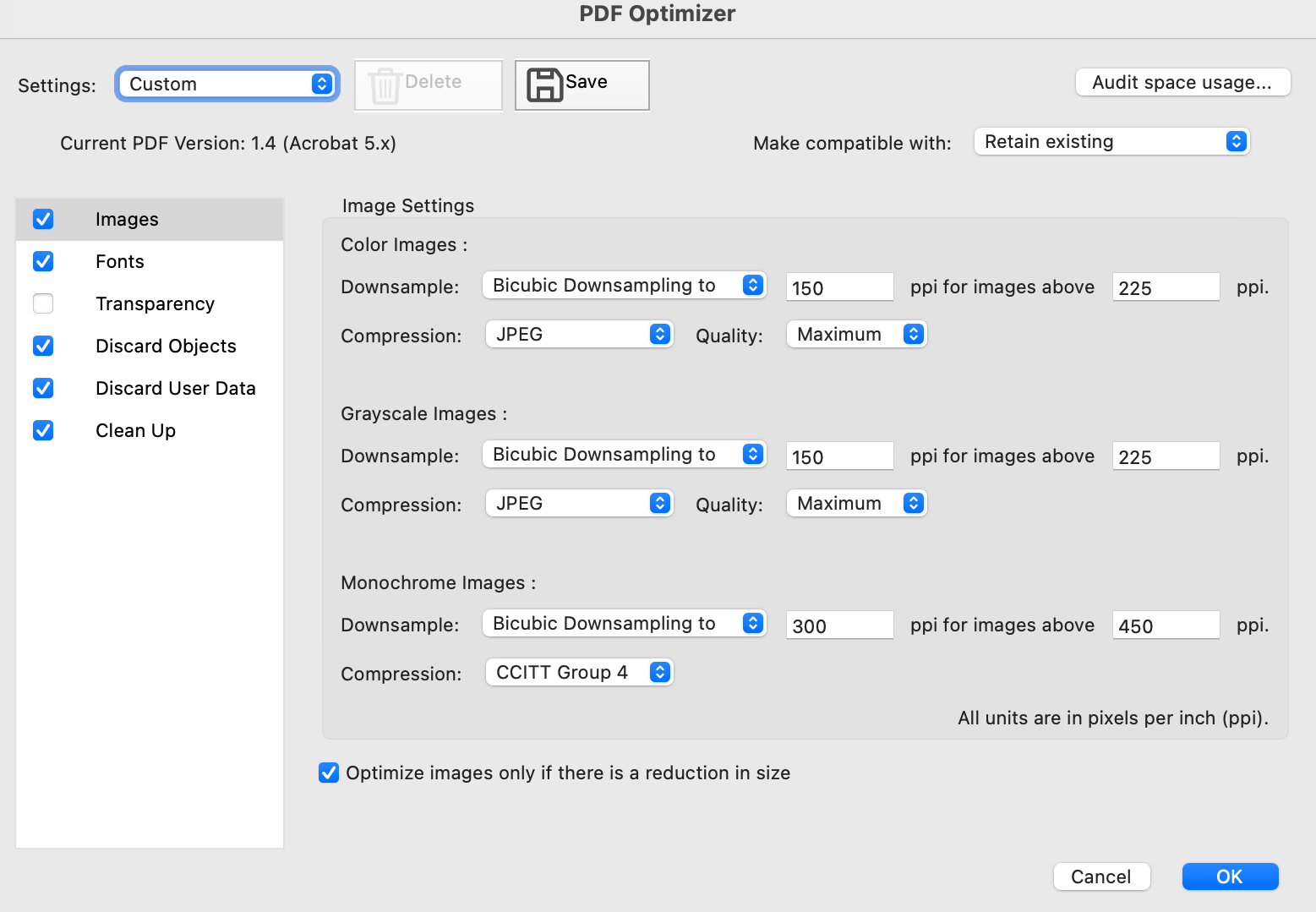
If you have a PDF that is huge because of the images within it, you can optimize the PDF with Adobe Acrobat. Do not use the option called “Reduce” because it compresses the images down to low quality and they’re all yucky and blocky. The move is to select File→Save As Other→Optimized PDF
The secret sauce here is in tweaking the quality and downsampling PPI. The screenshot is a good formula. 110MB PDF becomes 4MB. Congratulations, Dad! |
|