
Software Directory
This is automatically populated from the Software section.
A lot of this software is cross-platform. If it isn't, chances are there's an analog with a different name.
Some software has breakout pages for pro-tips and tutorials.
Software To Design, Create, & Edit
| Ableton Live | Audio editor and music composer - great for mixtapes |
| Adobe After Effects (AE) | VFX, Compositing, Motion Graphics |
| Adobe Audition (AU) | Audio Editing |
| Adobe Bridge (BR) | Local file management, batching, renaming |
| Adobe InDesign (ID) | Making decks, presentations, making books, making portfolios |
| Adobe Lightroom (LR) | Raw editing and photo library mgmt/ cloud services |
| Adobe Media Encoder (AME) | Export, watch-folders, transcode |
| Adobe Photoshop (PS) | Photo editing, still compositing |
| Adobe Premiere Pro (PR) | Video Editing, Titles, Color |
| Apple Keynote |
Making decks and presentations, but you can use it for a lot of things |
| Apple Pages |
Contemporary ClarisWorks.
It's just like Office or Google Docs except you don't have to pay for it and your data isn't being tracked 🙃 |
| Avid |
Video NLE Software
I’ve never used it, and it's never been a requirement or a desired software for any company or project I’ve worked on. I’ve only seen it in the wild once or twice. That said: it is used for feature film and documentaries and sometimes tour dorks use it to edit their show before they throw it into Disguise 🤢 |
| BMD DaVinci / Resolve |
Great and free video NLE and color software, but I need ADLs (Adobe Dynamic Link) too much. My need to have things colored does not outweigh the need for me to easily speak with After Effects.
EDLs (Edit Decision Lists) are a pain in the ass that should be done by the editor’s assistant’s assistants. Good luck verifying any speed ramps!! The BMD universe and Adobe CC interpret speed ramping differently. The solve is to either bake the ramp before an EDL, or do your color before your ramp! |
| EXIFTOOL |
A command line file auditing tool.
Very similar to FFPROBE, which is FFMPEG’s auditing tool. Slightly different. I tend to use EXIF to pull metadata details from video files so I can remember what lens was on the camera, or what aperture, etc. |
| FFMPEG / FFPROBE | Command line/terminal transcode, packaging of audio and video files. Very powerful. Faster than AME but steep learning curve for non-code folks. |
| Handbrake |
An FFMPEG top that's very very good. Been around forever. |
| Immersive Designer Pro (IDP) |
A dongle locked x64 only projection engineering tool. It’s pretty great, but it is Windows only and x64, so you can’t run it on ARM or Apple Silicone (even using Parallels).
Much of these tools can be manually rebuilt in Vectorworks with one massive piece missing: you can NDI or spout/syphon into IDP for real time previz and mapping tests. Very powerful. Every few months I try to run this on Paralells and it continues not to work (April 2023, last checked). |
| iZotope RX Audio Editor | Noise removal, steam creation, audio swiss army knife. Pricey but best in class utilities. |
| Jokyo HAP Encoder | A proprietary new version of the HAP encoder. It is an evolutionary version of the OG Vidvox HAP → Disguise HAP. Jokyo’s encoder is much better with banding and noise within gradients and introduces a new HAP format as well (HAPr). The tweakable options with Jokyo are superior as well. Can recommend. |
| Neat DeNoise | A great video / photo denoise tool (plugin for AE/PR), get its own section in software because it's so good. |
| Omnigraffle | A paid drawing app that is great for flow charts, system diagrams, projector rasters, etc. Better than drawing manually in Vectorworks, but harder than drawing automatically in Vectorworks (using ConnectCAD). |
| ShutterEncoder | A front end GUI (or “top”) for FFMPEG, FFPROBE, EXIFTOOL and more. Very good. Will do the trick for 90% of use cases. Thanks Melinda Sihalath for this one. |
| Sketchup (SKP) | A simpler tool for CAD that was free for at least a decade before it was sold by Google to another company. Lots of Millenials know how to use it. There is a free “viewer” companion app. |
| Topaz Video Enhance AI | A+ video upscale and restoration tool |
| Vectorworks (VWX) |
CAD for theatrical and event design (but also for architecture, landscaping things). There is a free “viewer” companion app.
Really good for projection engineering even if you're doing it manually (the built-in projector tools are not so thorough) |
A lot of this software is cross-platform. If it isn't, chances are there's an analog with a different name.
Some software has breakout pages for pro-tips and tutorials.
Software To Display, Interact, & Perform
| Ableton Live | Audio editor and music composer - great for mixtapes |
| Garagecube MadMapper (Mad / MM) |
Projection Mapping & Blending, Pixel & LED mapping
I use it for those things, but also:
|
| Garagecube Modul8 | VJ party time |
| Isadora (Izzy) | A node based creative software that’s a great tool to quickly build multimedia projects with. Good for performance, theater, dance, etc. |
| Open Frameworks (OF) | Creative code and scripting environment |
| QLab | Mac only audio / video cue system. Generally speaking, the standard tool for show audio control. This is a good thing to know how to use. It’s video capabilities are great for cueing as well, but not great for mapping IMHO. Pro-Tip NDI your video cue to another program or Syphon out for final output. |
| Resolume | VJ software; multi-display; video generators; cueing. |
| TouchDesigner | Like Isadora but does more things (except projection map as well). All the Izzy dorks now use Touch. |
| Unity | Like Unreal, but now kind of like “Beta” - By that I mean penultimate. Though I think it still has logic advantages. |
| Unreal Engine | A video game engine that CT uses for complex and interactive playback where game logic is helpful or there is a requirement for real-time realistic rendering |
| VDMX | Affordable, accessible, multi-platform custom playback and mapping software. |
Software For Data, Numbers, & Management
| AirTable |
Super powerful spreadsheet adjacent tool that's great for managing all kinds of data. Kanban, Gantt, Automation, Calendars. Really great.
I've heard it called "a better smarsheet" but I don't know what that is. |
| Apple Numbers | It's just like Excel or Google Sheets except you don't have to pay for it and your data isn't being tracked 🙃 |
| Google Sheets | Probably the best spreadsheet purist tool out there. Excel feels like ancient technology in comparison (though in some cases, you still need to use it). |
Software For Communications
| Discord | Slack for board-game nerds |
| iMessage | Contemporary AIM |
| Slack | Discord for businesses and political action |
Calculators, Unit Conversion, & Measurements
This section is a combination of apps and web apps that will help you do tons of different math things and save you some time.
Standalone Calculator Applications
| Netmedia.dev’s Timecode Calculator | Mac OS App Timecode Calculator. I've asked them to add in custom timecode... let's see! |
| Numi | A contextual calculator that will save custom functions, define variables, as well as formulas and you can use markdown within a calculator set (thanks to Sean Leo for this one). Highly recommended. |
| Units Master | Converting things like feet and meters, also a calculator for feet / inches / fractions. All about size things. You can do a lot of this in-line in Vectorworks, but this is a little faster. Their hotkeys are a little weird and can’t find the doc right now but “F” will do feet (not ‘) and “I” will do inches (not “). |
| Or just use a spreadsheet 😉 - Google Sheets is free and good. Apple’s Numbers is free and fine – the better feature is that Apple’s Keynote and Pages have tables that allow you to use spreadsheet formulas. Microsoft’s Excel is good, too, just bulky as hell and why pay for something if you can get it for free… oh yeah because nothing is free in this life. |
|
Here’s an example Numi recipe for calculating file transfer times over x bandwidth:
// manual entry //
// enter target file size MBs in variable vFileSizeMB //
vFileSizeMB = 3370363.64 MB = 3,370,363.64 MB
vFileSizeBG = vFileSizeMB in GB = 3,370.36 GB
vFileSizeTB = vFileSizeMB in TB = 3.37 TB
// enter bandwidth in megabits per second //
vMbiPS = 700 Mb = 700 Mb
// auto calc //
vMByPS = vMbiPS in MB = 87.5 MB
vEstimateSeconds = vFileSizeMB/VMByPS  = 38,518.44
VEstimate = vEstimateSeconds*1seconds in hours  = 10 h 41 min 58 s
Web Application Calculators
| FOV Calculator |
for when you need to calculate the field of view for a camera based on sensor size / lens MM / etc. Very useful. The person who made this is a very smart psychopath. |
| Projector Central Throw Distance Calculator |
Brand agnostic. Definitely the go-to calculator for quick things. Good for estimating brightness. Usually not as up to date as brand calculators – there’s a lag for new projectors and lenses. You should always verify with brand calculators and sometimes, you just need to get the projector on a bench and try it out. There are some calculators that are off, but it’s usually marginal and it’s rare. |
| Projector Screen Rando Calculators | Collection of projector calculators - fL, viewing angle, throw distance etc. They’ve got most projector, models. If they don’t check a manufacturer directly. Remember a .5:1 throw isn’t 100% 1:1 between models. Chip sizes change this match just a little bit. Point being :5:1 on one model isn’t the same as .5:1 on another, but they’re close! |
| Proportional Calculator | For when you’re feeling lazy about doing proportional algebra and you don't want to open a Google Sheet or use Numi or a calculator. |
| PPD Calculator | Viewing Angle and Screen Door Math |
Custom Calculators
|
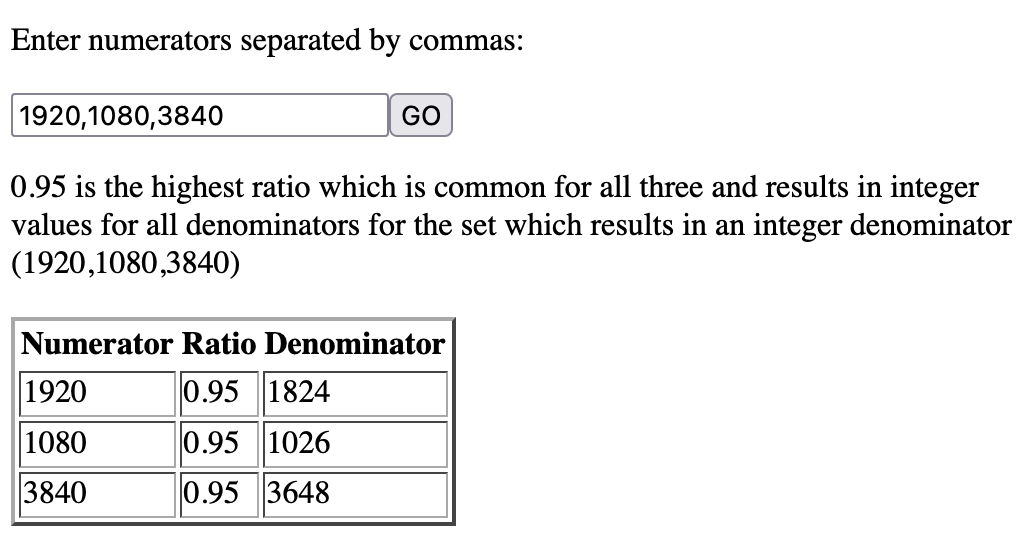
My buddy Avery built out a calculator to determine a max scale based on a series of values.
The goal with this tool was to be able to find what the largest scale possible is that results in whole numbers based on multiple numbers. You need whole numbers when you’re working with pixels! |
|
|
Brand Specific Projector Calculators
- BARCO throw calculator
- Epson throw calculator
- NEC throw calculator
- Optoma throw calculator
- PANAsonic throw calculator
Measuring Documents Digitally
For when you don’t want to open Vectorworks, or when you want to get information quick + dirty
|
|
|
If you’re given a ground plan or elevations and they are to-scale (eg ¼” = 1’0”), you can open up the Preview app (on a mac), press Command-I, go over to the crop options, and change the units to inches.
Then you make a selection box in preview, and get the approximate dimensions of that selection.
In this example, I’ve made a selection that is 1x1” (the width and height).
This is the equivalent of 4x4’ in ¼” scale. |
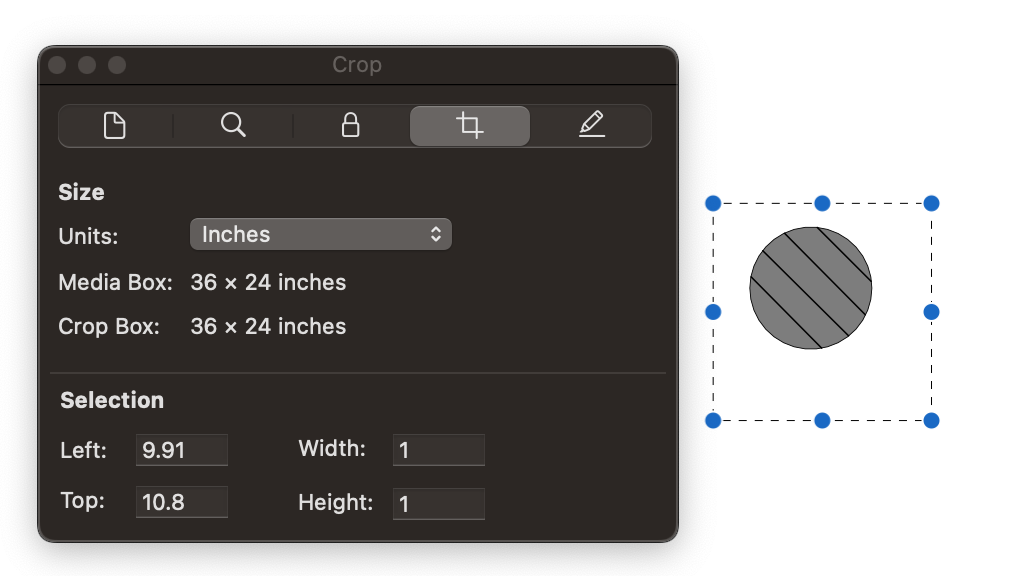
A good way to verify whether or not the drawing is to the scale that it is indicated to be using, is to measure it against something you “know”
In ¼” scale:
sheet goods are often 4x8’ AKA 1x2”
doors are often 2’6”-3’ wide AKA 0.625-0.75”
Any scale indicators on the page (annotated dimensions FTW)
A spec for something that you can look up (like projector dimensions, for example)
Unfortunate Caveat: It is fairly typical to receive drawings with indicated scales that are wrong or are inconsistent from drawing to drawing on a single page. This is something I’ve dealt with from MEPs, GCs, Architects, Scenic Designers and Manufacturers!
The best thing to do is ask for something with a correctly indicated scale, but that isn’t always possible.
Or learn some 3D CAD and/or 3D visual fx software and ask for the CAD!
General Use Tools
| 1Password | If you’re not using 1Password, or a program like it, do so immediately. 1Password is a tool that you use to track all your password and login information. You just need to know the primary password and have the secret key on hand somewhere for initial setup. I use 1Password across multiple devices, systems, and OS’ to track all my passwords. It’ll change your life. Worth every penny. DropBox offers a similar service for free (with a Pro account or higher), but I’ve never bothered. I’m sure it’s fine, but don’t know anyone who uses it! |
|||
| DaisyDisk | Mac OS application that indexes drives / folders so that utilization can be better analyzed through visualization. If you’re trying to free up some space, or you have some unknown bloat, this is a good tool to find out why and where (see also Grand Perspective). |
|||
| Czkawka | Duplicate file finder and more! Requires some homebrew commands to be able to use the GUI version. |
|||
| FreeFileSync | Free, donation ware. Very similar to Sync Folders Pro, but available across different operating systems and more widely used. Have seen the fastest possible web transfers using this program. Thanks to Dylan Steenkamp for this gem. |
|||
| Grand Perspective | Mac OS application that does exactly the same thing as DaisyDisk except it’s way less sexy. The block format, however, may be preferred over DD, which has files represented circularly. I thought they stopped developing a while ago, but they are still going as of summer 2023. Happy to see that! |
|||
| Jump Desktop |
Enterprise screenshare tool with really low latency used for Post Production work (and good for almost everything else, too). |
|||
| Magnet |
Mac OS level shortcut that allows you to use hotkeys to arrange application windows. Very good, but some Magnet shortcuts have conflicts with specific software, like After Effects. This automatically disables Magnet shortcuts when that is the active app. This is rare! I believe conflicts can be avoided, but it is a manual process of cross checking between apps. I’ll update here if/when I figure out a smarter way to fix that.
Another bug is that Adobe Illustrator will work dumb slow in some cases with Magnet enabled. |
|||
| MonitorControl | Gives you control of Audio and Brightness settings for external monitors. You know when you plug in a display and you can’t mute or use the Mac volume buttons to change the levels? This allows you to use your OS volume and brightness keys to control an external monitor – just make sure to allow it to work in Privacy & Security → Accessibility |
|||
| Parallels | A way to run Windows OS on an Apple ARM Silicone. On older devices (MacIntel), BootCamp is preferable. On ARM, you can’t run contemporary AAA games, but you can run Star Wars Battlefront II (the OG one from 2005). |
|||
| Parsec | A screenshare software that is very reliable and has a good frame rate. Developed originally by Unity for cloud gaming. Good for remote management, but has a very annoying setup protocol that I’ll breakout here at some point. Can hit servers with tons of screens, but not Mosaic. Windows/Mac. | |||
| Restart on Crash | Windows utility that you can set to automatically launch a crashed program. Be warned: increase the timeout so you don’t launch tons of application instances. Also, doesn’t work if theres a system dialog that hangs the program… |
|||
| ScreenConnect | A nicely priced screenshare software with tons of iT features, tiered access levels, managed accounts, the ability to brand the application to your company. Can hit servers with up to 8ish screens, including Mosaic. Windows/Mac. Latency aggressive for post-production work but good for IT. |
|||
| Sync Folders Pro | Great auto-sync, backup, merge tool. Build and save actions. Recommended. | |||
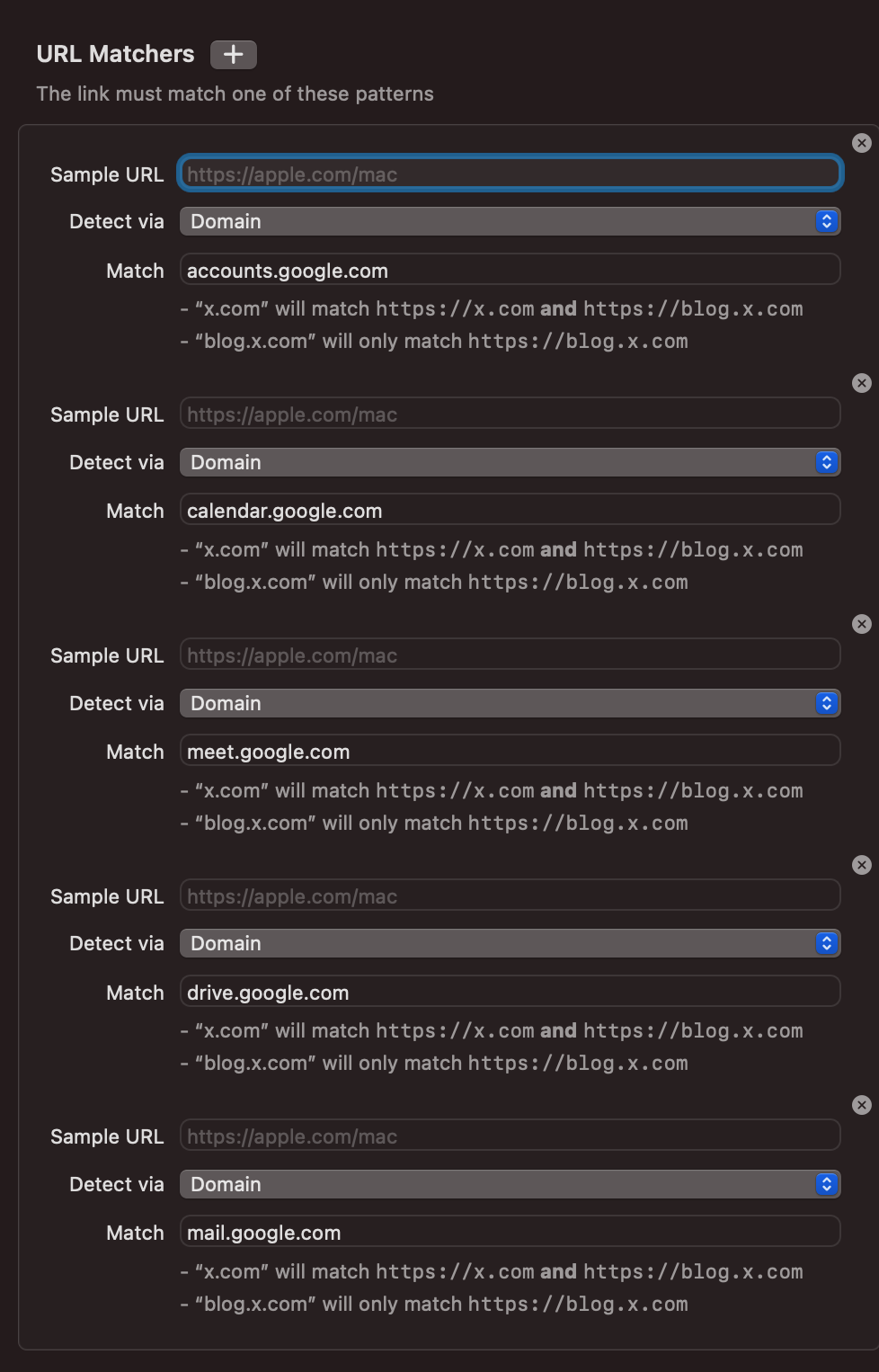
| Velja |
|
|||
| VLC (Video Lan Client) | A utilitarian AV player for Mac/Windows that’s been around since forever. It can play most, but not all, things. It’s free. You can playlist assets. A very good swiss army knife. Has command line controls, too! | |||
| WebKiosk | A lockdown app for Mac OS by xproline.io to turn a Mac into a locked kiosk running a WebApp. Paid version. Used it in 2024 for a bunch of webapp demos and it works real good. Link. | |||
| WiFi Explorer | Mac OS application that allows you to see all the available wifi networks around you. This can help you narrow down channel usage to prevent congestion. It's also helpful to determine WAP placement. Some pro-tips here. |
|||
| WinDirStat | A Windows application that does the same thing as DaisyDisk or Grandperspective: visually indexes hard drive utilization to help manage computer storage. |
|||
No comments to display
No comments to display