
Google Sheets - Super Menu w/ Apps Script
Add a sweet fuckin' menu in Google Sheets that will shave off hours of your life. After all, time is the only resource you can never get back.
- Replace fill color (replaceFillColor) - Finds all cells with hex color and replaces the hex color of your choosing
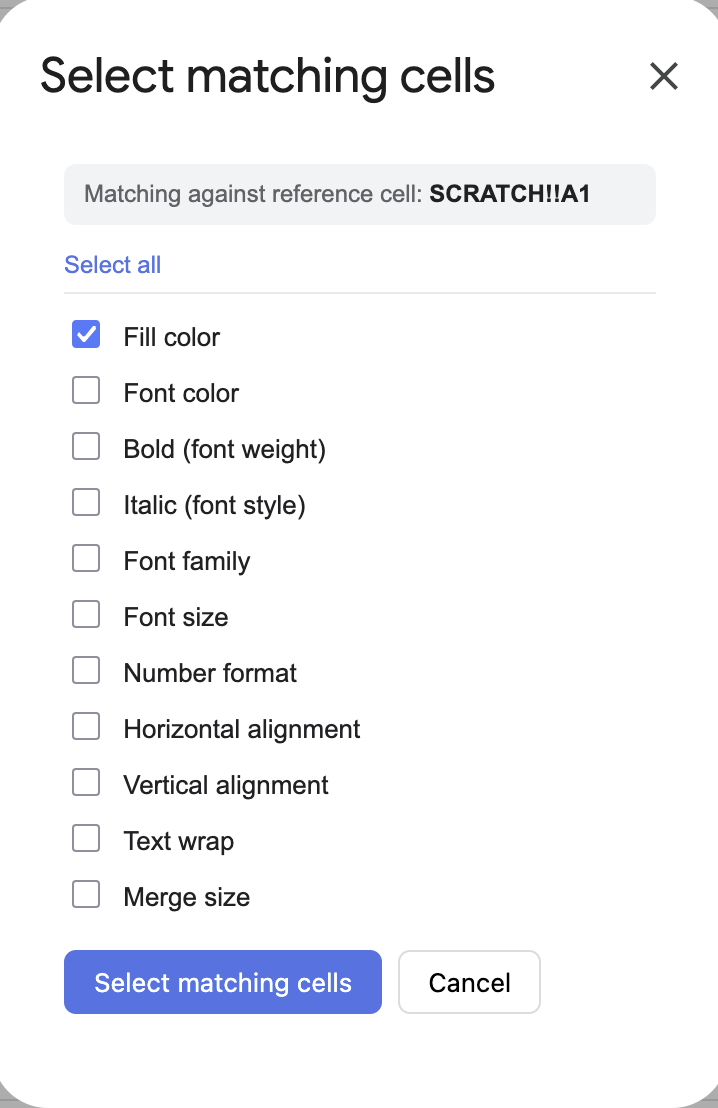
- Select matching cells (selectMatchingCells) - This one is so tight, you can find all cells that match certain conditions and bulk edit them.
- Copy (Formula Safe) - this copies formats and formulas of a selection
- Paste (Formula Safe) - this copies formats and formulas of a selection, formulas references are absolute and aren't transposed (unless they are referenced within the copied selection, and then the self-reference updates). You're welcome!!!
Here's the Apps Script
/**
 * Tech Almanac Tools — utilities under a sub menu:
 *   1. Replace fill color   (replaceFillColor)
 *   2. Select matching cells (selectMatchingCells)
 *   3. Copy (Formula Safe) - this copies formats and formulas of a selection
 *   4. Paste (Formula Safe) - this copies formats and formulas of a selection, formulas references are absolute and aren't transposed (unless they are referenced within the copied selection, and then the self-reference updates). You're welcome!!!
 * "Select matching cells" needs a companion HTML file named "MatchDialog".
 */

function onOpen() {
  SpreadsheetApp.getUi()
    .createMenu('Tech Almanac Tools')
    .addItem('Replace fill color…', 'replaceFillColor')
    .addItem('Select matching cells…', 'selectMatchingCells')
    .addSeparator()
    .addItem('Copy (formula-safe)', 'formulaSafeCopy')
    .addItem('Paste (formula-safe)', 'formulaSafePaste')
    .addToUi();
}

/* ============================================================
 * TOOL 1 — Replace fill color
 * ============================================================ */

function replaceFillColor() {
  const ui = SpreadsheetApp.getUi();
  const sheet = SpreadsheetApp.getActiveSheet();

  const findResp = ui.prompt(
    'Replace fill color',
    'Color to FIND (hex, e.g. #cfecff):',
    ui.ButtonSet.OK_CANCEL
  );
  if (findResp.getSelectedButton() !== ui.Button.OK) return;
  const findColor = normalizeHex(findResp.getResponseText());
  if (!findColor) {
    ui.alert('That doesn\'t look like a valid hex color. Try something like #cfecff.');
    return;
  }

  const replaceResp = ui.prompt(
    'Replace fill color',
    'Color to REPLACE it with (hex, e.g. #ffffff):',
    ui.ButtonSet.OK_CANCEL
  );
  if (replaceResp.getSelectedButton() !== ui.Button.OK) return;
  const replaceColor = normalizeHex(replaceResp.getResponseText());
  if (!replaceColor) {
    ui.alert('That doesn\'t look like a valid hex color. Try something like #ffffff.');
    return;
  }

  const range = sheet.getDataRange();
  const backgrounds = range.getBackgrounds();
  const startRow = range.getRow();
  const startCol = range.getColumn();

  const matchedA1 = [];
  for (let r = 0; r < backgrounds.length; r++) {
    for (let c = 0; c < backgrounds[r].length; c++) {
      if (backgrounds[r][c].toLowerCase() === findColor) {
        backgrounds[r][c] = replaceColor;
        matchedA1.push(sheet.getRange(startRow + r, startCol + c).getA1Notation());
      }
    }
  }

  if (matchedA1.length === 0) {
    ui.alert('No cells with fill ' + findColor + ' found on "' + sheet.getName() + '".');
    return;
  }

  sheet.setActiveRangeList(sheet.getRangeList(matchedA1));

  const confirm = ui.alert(
    'Confirm replacement',
    'Found ' + matchedA1.length + ' cell(s) with ' + findColor +
    ' on "' + sheet.getName() + '".\n\nReplace their fill with ' + replaceColor + '?',
    ui.ButtonSet.OK_CANCEL
  );
  if (confirm !== ui.Button.OK) return;

  range.setBackgrounds(backgrounds);
  SpreadsheetApp.getActive().toast('Replaced ' + matchedA1.length + ' cell(s).', 'Done', 5);
}

/**
 * Normalize a user-entered hex string to lowercase 6-digit form (#rrggbb).
 * Accepts "#cfecff", "cfecff", "#abc", "abc". Returns null if invalid.
 */
function normalizeHex(input) {
  if (!input) return null;
  let h = input.trim().toLowerCase().replace(/^#/, '');
  if (/^[0-9a-f]{3}$/.test(h)) {
    h = h.split('').map(function (ch) { return ch + ch; }).join('');
  }
  if (/^[0-9a-f]{6}$/.test(h)) return '#' + h;
  return null;
}

/* ============================================================
 * TOOL 2 — Select matching cells
 * ============================================================ */

function selectMatchingCells() {
  const html = HtmlService.createHtmlOutputFromFile('MatchDialog')
    .setWidth(320)
    .setHeight(460);
  SpreadsheetApp.getUi().showModalDialog(html, 'Select matching cells');
}

/** Called by the dialog on load, to show which cell is the reference. */
function getActiveCellAddress() {
  const sheet = SpreadsheetApp.getActiveSheet();
  return sheet.getName() + '!' + sheet.getActiveCell().getA1Notation();
}

/**
 * Called by the dialog. `options` is an object of booleans keyed by attribute.
 * Selects every cell on the active sheet that matches the reference cell on
 * all enabled attributes. Returns { count } or { error }.
 */
function runMatch(options) {
  const sheet = SpreadsheetApp.getActiveSheet();
  const range = sheet.getDataRange();
  const startRow = range.getRow();
  const startCol = range.getColumn();
  const numRows = range.getNumRows();
  const numCols = range.getNumColumns();

  // Reference cell position relative to the data range.
  const active = sheet.getActiveCell();
  let refR = active.getRow() - startRow;
  let refC = active.getColumn() - startCol;
  if (refR < 0 || refC < 0 || refR >= numRows || refC >= numCols) {
    return { error: 'Select a cell that contains data first, then run this again.' };
  }

  // Read only the attribute matrices we actually need.
  const data = {};
  if (options.background)   data.background   = range.getBackgrounds();
  if (options.fontColor)    data.fontColor    = range.getFontColors();
  if (options.fontWeight)   data.fontWeight   = range.getFontWeights();
  if (options.fontStyle)    data.fontStyle    = range.getFontStyles();
  if (options.fontFamily)   data.fontFamily   = range.getFontFamilies();
  if (options.fontSize)     data.fontSize     = range.getFontSizes();
  if (options.numberFormat) data.numberFormat = range.getNumberFormats();
  if (options.hAlign)       data.hAlign       = range.getHorizontalAlignments();
  if (options.vAlign)       data.vAlign       = range.getVerticalAlignments();
  if (options.wrap)         data.wrap         = range.getWraps();

  const hasAttr = Object.keys(data).length > 0;
  if (!hasAttr && !options.merge) {
    return { error: 'Pick at least one condition to match on.' };
  }

  // Build merge maps: dimensions string per cell + which cells are anchors.
  const mergeDims = [];
  const isAnchor = [];
  for (let r = 0; r < numRows; r++) {
    mergeDims[r] = new Array(numCols).fill('1x1');
    isAnchor[r] = new Array(numCols).fill(true);
  }
  const merges = range.getMergedRanges();
  merges.forEach(function (m) {
    const mr = m.getRow() - startRow;
    const mc = m.getColumn() - startCol;
    const rows = m.getNumRows();
    const cols = m.getNumColumns();
    const dim = rows + 'x' + cols;
    for (let r = mr; r < mr + rows; r++) {
      for (let c = mc; c < mc + cols; c++) {
        if (r >= 0 && c >= 0 && r < numRows && c < numCols) {
          mergeDims[r][c] = dim;
          isAnchor[r][c] = (r === mr && c === mc);
        }
      }
    }
    // Snap the reference to its merge anchor if it sits inside this merge.
    if (refR >= mr && refR < mr + rows && refC >= mc && refC < mc + cols) {
      refR = mr;
      refC = mc;
    }
  });

  // Reference values.
  const ref = {};
  Object.keys(data).forEach(function (k) {
    ref[k] = norm(k, data[k][refR][refC]);
  });
  const refMerge = mergeDims[refR][refC];

  // Scan and collect anchor cells that match on every enabled attribute.
  const matched = [];
  for (let r = 0; r < numRows; r++) {
    for (let c = 0; c < numCols; c++) {
      if (!isAnchor[r][c]) continue; // skip interior cells of merges
      let ok = true;
      for (const k in data) {
        if (norm(k, data[k][r][c]) !== ref[k]) { ok = false; break; }
      }
      if (ok && options.merge && mergeDims[r][c] !== refMerge) ok = false;
      if (ok) matched.push(sheet.getRange(startRow + r, startCol + c).getA1Notation());
    }
  }

  if (matched.length === 0) return { count: 0 };
  sheet.setActiveRangeList(sheet.getRangeList(matched));
  return { count: matched.length };
}

/** Normalize values so equivalent formats compare equal (colors are case-folded). */
function norm(key, val) {
  if (key === 'background' || key === 'fontColor') return String(val).toLowerCase();
  return val;
}

// ── Formula-Safe Copy ────────────────────────────────────────────────────────

function formulaSafeCopy() {
  const sheet = SpreadsheetApp.getActiveSpreadsheet().getActiveSheet();
  const range = sheet.getActiveRange();

  // Store the A1 notation and sheet name in script properties
  const props = PropertiesService.getScriptProperties();
  props.setProperty('FSC_RANGE',  range.getA1Notation());
  props.setProperty('FSC_SHEET',  sheet.getName());

  SpreadsheetApp.getUi().alert(
    `Copied ${range.getA1Notation()} — now select your destination cell and run Paste (formula-safe).`
  );
}

// ── Formula-Safe Paste ───────────────────────────────────────────────────────

function formulaSafePaste() {
  const ui    = SpreadsheetApp.getUi();
  const props = PropertiesService.getScriptProperties();
  const srcRangeNotation = props.getProperty('FSC_RANGE');
  const srcSheetName     = props.getProperty('FSC_SHEET');

  if (!srcRangeNotation || !srcSheetName) {
    ui.alert('Nothing copied yet — run Copy (formula-safe) first.');
    return;
  }

  const ss       = SpreadsheetApp.getActiveSpreadsheet();
  const srcSheet = ss.getSheetByName(srcSheetName);
  const srcRange = srcSheet.getRange(srcRangeNotation);

  // Grab formulas (as strings) and display values separately
  const formulas = srcRange.getFormulas();       // raw formula strings, e.g. "=A1+B1"
  const values   = srcRange.getDisplayValues();  // what the cell shows if not a formula

  // Source range bounds
  const srcRow  = srcRange.getRow();
  const srcCol  = srcRange.getColumn();
  const srcRows = srcRange.getNumRows();
  const srcCols = srcRange.getNumColumns();

  // Destination anchor
  const dest    = ss.getActiveSheet().getActiveRange();
  const destRow = dest.getRow();
  const destCol = dest.getColumn();

  // Row/col offset from source to destination
  const rowOffset = destRow - srcRow;
  const colOffset = destCol - srcCol;

  // Regex matches cell addresses like B4, $B$4, B$4, $B4
  const cellRef = /(\$?)([A-Za-z]{1,3})(\$?)(\d+)/g;

  /**
   * If the address falls within the source range, shift it by the paste offset.
   * Anchored ($) axes are never shifted, matching normal paste behaviour.
   * Addresses outside the source range are left untouched.
   */
  function shiftIfInRange(colAnchor, colLetter, rowAnchor, rowNum) {
    const col = columnLetterToIndex(colLetter.toUpperCase());
    const row = parseInt(rowNum, 10);
    if (row >= srcRow && row < srcRow + srcRows &&
        col >= srcCol && col < srcCol + srcCols) {
      const newCol = colAnchor ? col : col + colOffset;
      const newRow = rowAnchor ? row : row + rowOffset;
      return (colAnchor ? '$' : '') + columnIndexToLetter(newCol) +
             (rowAnchor ? '$' : '') + newRow;
    }
    return (colAnchor ? '$' : '') + colLetter.toUpperCase() +
           (rowAnchor ? '$' : '') + rowNum;
  }

  // Build payload: rewrite intra-range references, pass external refs through as-is
  const payload = formulas.map((row, r) =>
    row.map((formula, c) => {
      if (formula === '') return values[r][c];
      return formula.replace(cellRef, (match, ca, cl, ra, rn) =>
        shiftIfInRange(ca, cl, ra, rn)
      );
    })
  );

  const destRange = ss.getActiveSheet().getRange(
    destRow, destCol, payload.length, payload[0].length
  );

  // Copy formatting first, then overwrite with values/formulas
  srcRange.copyTo(destRange, SpreadsheetApp.CopyPasteType.PASTE_FORMAT, false);
  destRange.setValues(payload);
}

// ── Helpers ──────────────────────────────────────────────────────────────────

function columnLetterToIndex(letters) {
  let n = 0;
  for (let i = 0; i < letters.length; i++) {
    n = n * 26 + (letters.charCodeAt(i) - 64);
  }
  return n;
}

function columnIndexToLetter(n) {
  let s = '';
  while (n > 0) {
    const rem = (n - 1) % 26;
    s = String.fromCharCode(65 + rem) + s;
    n = Math.floor((n - 1) / 26);
  }
  return s;
}
Here's the MarchDialog.html for the Select Matching Cells Modal
<!DOCTYPE html>
<html>
<head>
  <base target="_top">
  <style>
    body {
      font-family: Arial, Helvetica, sans-serif;
      font-size: 13px;
      color: #202124;
      margin: 12px;
    }
    .ref {
      background: #f1f3f4;
      border-radius: 6px;
      padding: 8px 10px;
      margin-bottom: 12px;
      font-size: 12px;
      color: #5f6368;
    }
    .ref b { color: #202124; }
    label {
      display: block;
      padding: 4px 0;
      cursor: pointer;
    }
    label input { margin-right: 8px; }
    .toggle {
      margin-bottom: 6px;
      padding-bottom: 6px;
      border-bottom: 1px solid #e8eaed;
    }
    .toggle a {
      font-size: 12px;
      color: #1a73e8;
      text-decoration: none;
      cursor: pointer;
    }
    .toggle a:hover { text-decoration: underline; }
    .buttons {
      margin-top: 14px;
      display: flex;
      gap: 8px;
    }
    button {
      font-size: 13px;
      padding: 7px 14px;
      border-radius: 6px;
      border: 1px solid #dadce0;
      background: #fff;
      cursor: pointer;
    }
    button.primary {
      background: #1a73e8;
      color: #fff;
      border-color: #1a73e8;
    }
    button:disabled { opacity: 0.5; cursor: default; }
    #status { margin-top: 12px; font-size: 12px; min-height: 16px; }
    #status.err { color: #c5221f; }
    #status.ok { color: #188038; }
  </style>
</head>
<body>
  <div class="ref">
    Matching against reference cell: <b id="refCell">…</b>
  </div>

  <div class="toggle">
    <a href="#" id="toggleAll" onclick="toggleAll(); return false;">Select all</a>
  </div>

  <div id="opts">
    <label><input type="checkbox" id="background" checked> Fill color</label>
    <label><input type="checkbox" id="fontColor"> Font color</label>
    <label><input type="checkbox" id="fontWeight"> Bold (font weight)</label>
    <label><input type="checkbox" id="fontStyle"> Italic (font style)</label>
    <label><input type="checkbox" id="fontFamily"> Font family</label>
    <label><input type="checkbox" id="fontSize"> Font size</label>
    <label><input type="checkbox" id="numberFormat"> Number format</label>
    <label><input type="checkbox" id="hAlign"> Horizontal alignment</label>
    <label><input type="checkbox" id="vAlign"> Vertical alignment</label>
    <label><input type="checkbox" id="wrap"> Text wrap</label>
    <label><input type="checkbox" id="merge"> Merge size</label>
  </div>

  <div class="buttons">
    <button class="primary" id="run" onclick="run()">Select matching cells</button>
    <button onclick="google.script.host.close()">Cancel</button>
  </div>

  <div id="status"></div>

  <script>
    var KEYS = ['background','fontColor','fontWeight','fontStyle','fontFamily',
                'fontSize','numberFormat','hAlign','vAlign','wrap','merge'];

    google.script.run.withSuccessHandler(function (addr) {
      document.getElementById('refCell').textContent = addr;
    }).getActiveCellAddress();

    function setStatus(msg, cls) {
      var s = document.getElementById('status');
      s.textContent = msg;
      s.className = cls || '';
    }

    function syncToggleLabel() {
      var allChecked = KEYS.every(function (k) {
        return document.getElementById(k).checked;
      });
      document.getElementById('toggleAll').textContent = allChecked ? 'Select none' : 'Select all';
    }
    KEYS.forEach(function (k) {
      document.getElementById(k).addEventListener('change', syncToggleLabel);
    });
    syncToggleLabel();

    function toggleAll() {
      var allChecked = KEYS.every(function (k) {
        return document.getElementById(k).checked;
      });
      KEYS.forEach(function (k) { document.getElementById(k).checked = !allChecked; });
      syncToggleLabel();
    }

    function run() {
      var options = {};
      KEYS.forEach(function (k) { options[k] = document.getElementById(k).checked; });

      var btn = document.getElementById('run');
      btn.disabled = true;
      setStatus('Scanning…');

      google.script.run
        .withSuccessHandler(function (result) {
          btn.disabled = false;
          if (result.error) { setStatus(result.error, 'err'); return; }
          if (result.count === 0) { setStatus('No matching cells found.', 'err'); return; }
          setStatus('Selected ' + result.count + ' cell(s). Closing…', 'ok');
          setTimeout(google.script.host.close, 700);
        })
        .withFailureHandler(function (err) {
          btn.disabled = false;
          setStatus(err.message || String(err), 'err');
        })
        .runMatch(options);
    }
  </script>
</body>
</html>
No comments to display
No comments to display